



- Included with the Pro Plan
- All sales are final; if a course is not right, you can exchange it for store credit within 30 days.
Commercial Retouching
Commercial Retouching Workflow: Products & Apparel
Learn the industry's most advanced Photoshop techniques today

Own it
$ 149
Yours permanently. Includes every download, working file and asset that ships with the course.
Get everything
$199/year
Renews annually. Cancel anytime before renewal from your account.
-
 35
lessons
35
lessons
-
 15h 7m
runtime
15h 7m
runtime
-
 33
assets included
33
assets included
-
 EN
closed captions
EN
closed captions
-
 ES
subtitles
ES
subtitles
- Photoshop
Overview
LEARN WORKFLOWS USED IN RETOUCHING STUDIOS
In this tutorial, Sef McCullough - one of the world's most sought retouchers - shares his advanced workflow secrets. You'll learn how to create stunning results with professional post-production techniques. So if you're ready to take your business skills to new heights, start here and learn a bulletproof editing workflow.

LEARN TO SPEAK RETOUCHING
If you're looking for a way to stand out from other retouchers in your market and get more clients, then learning these advanced Photoshop techniques is exactly what you need! This course will show you how it's done so that when people see your work they know instantly that it was created by someone who knows what they are doing.
 2:25
2:25 3:58
3:58What you’ll learn
- 01 Read a client brief and set up a commercial workspace
- 02 Clip, isolate and mark up product and apparel files
- 03 Contour, build backgrounds and construct believable shadows
- 04 Colour grade, finish and prepare files for client send-off
- 05 Handle two rounds of client revisions through to final delivery
Curriculum
35 lessons · 15h 7m·3 chapters
01 Trailers & Extras
-
01
Commercial Workflow Apparel Trailer
2m
Watch Sef McCullough and his commercial workflow on a real retouching job and understand how he approaches this industry for success.
-
02
Get To Know Sef McCullough
4m
Sef’s quest of higher level retouching as technology evolved, working with some of the world’s largest and most visible businesses.
-
03
Discover The Best Commercial Workflow
1m
Sef McCullough teaches the secrets and best pratcies of his commercial retouching workflow in products and apparel.
02 1 - Commercial Workflow
-
01
The Client Brief
27m
Participate in a practical, creative brief with renowned retoucher Sef McCullough and photographer Adam Levy in this video.
-
02
Setting Up Your Workspace
10m
Learn from an experienced practitioner how to organize & optimize correct tools. Learn how to personalize your workspace & store settings.
-
03
RAW Processing
5m
Learn the importance of using a camera RAW module to process RAW image data. Learn how to restore essential data & create balance in image
-
04
Shaping
16m
Learn keyboard shortcuts and tool comparisons to expedite your workflow. Retoucher will take you through the best workflow retouching
-
05
Clipping and Isolation
44m
Sef McCullough, a high-end retoucher, will show you the two greatest methods for using the Pen Tool: normal clipping and two pass clipping.
-
06
File Setup
42m
Learn to create a thorough organizing strategy and keep using smart objects to leverage the benefits of a non-destructive workflow.
-
07
Markup
6m
Walk through & dissect Nike Air Max shoe, using markup to note & idealize all forms. Learn best retouching practices for products & apparel.
-
08
Cleanup
44m
Follow Sef McCullough for an advanced method of frequency separation. Markup is finished, so move on to cleaning Nike Air Max running shoe.
-
09
Contouring
41m
Use the power of Photoshop’s curve tools, to dodge and burn your image & create subtle dimension. Watch the tutorial to learn more.
-
10
Background
22m
With the complex technical phase complete, move into the creative exploration of retouching. Learn to play with hue, saturation, and color.
-
11
Shadow
24m
For a plausible color build, use curves and hue/saturation stacking. Separately and in an ordered manner, adjust the luminance and color.
-
12
Creative Elements-Bubble Sole
42m
Observe how Sef retouches the athletic shoe’s bubble sole and adds some of the retouch’s more intricate aspects.
-
13
Color Grade
14m
Learn how to color grade and apply additional lighting effects to the Nike Air Max athletic shoe using paths, curves, and groups.
-
14
Workflow-Finishing
14m
Create a consistent, completed surface by using high-pass and some grain across the surface of the shoe. Watch the tutorial to learn more.
-
15
File Prep for Send Off
2m
Learn best practices for sending files to your client. Sef McCullough discusses the dos and don’ts of sharing data with clients.
-
16
First Review
32m
Watch the conversation between Sef and Adam about evaluating the existing work and creating a procedure for the second round of retouching.
-
17
First Revisions
40m
In this tutorial, work with the expert retoucher Sef McCullough to execute the notes from the first review on the call.
-
18
Second Review
15m
After the first round of adjustments, watch as high-end retoucher Sef McCullough conducts a second live review to go over image progress.
-
19
Second Revisions
15m
Following the second round of review, learn to adapt with continuous notes, use the knowledge a client provides, and comprehend.
-
20
Final Delivery
10m
After receiving the client’s final clearance, Sef McCullough begins applying the finishing touches to create a commercial deliverable image.
03 2 - Lifestyle Application
-
01
Introduction and Creating a Plan
9m
With retouching a commercial shoe complete, apply the system to a new lifestyle image. Learn the retouching basics from Sef McCullough.
-
02
Linked Workflow
17m
Watch the tutorial by the expert retoucher, Sef McCullough and begin retouching the lifestyle image by creating balance in the RAW file.
-
03
Shoe Retouching
1h 15m
Begin perfecting the replacement shoe pieces for compositing into the primary lifestyle base image once you’ve built a linked workflow.
-
04
Integration
40m
Integrate the parts into the primary lifestyle base image with proper clipping and isolation of the replacement shoes.
-
05
Isolation
17m
Sef McCullough will show you how to isolate each part of the athlete’s body in this video of workflow retouching tutorial.
-
06
Lifestyle Workflow File Setup
30m
Create a folder structure for a smooth workflow once the athlete has been completely segmented into different masks for each body part.
-
07
Lifestyle Workflow Cleanup
49m
Let’s move forward into frequency separation to cleanup the skin and apparel. Catch the best retouching practices in this tutorial.
-
08
Skin Clean Up
28m
Retouch skin with ease with Frequency Separation 2.0’s revolutionary texture cleanup technology. Watch the tutorial to learn more.
-
09
Color Change
21m
Learn in this tutorial how Sef retouches the athelete’s image with creativity, concentrating on colour manipulation.
-
10
Subject and Background Integration
38m
Create a clean, refined, high-end extraction for outstanding results. Learn a few methods from Sef McCullough to speed up your process.
-
11
Mood and Grade
1h 4m
Observe in this tutorial how Sef McCullough works on drama, color harmony, and life-affirming aspects of the image.
-
12
Final Look and Fixes
47m
Watch in this tutorial what finishing touches Sef McCullough gives to complete the lifestyle image and make it look stunning.
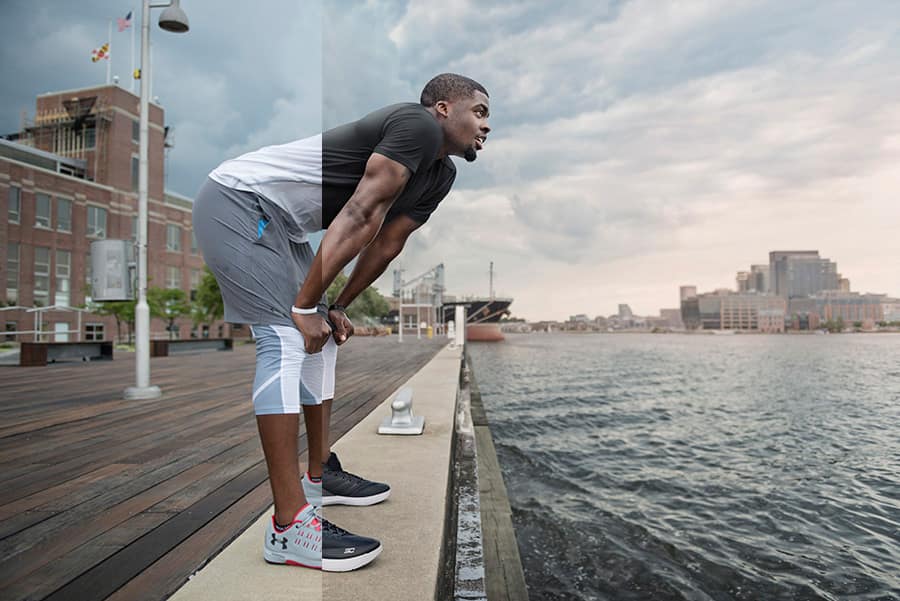
Before & after


Your instructor
Sef McCullough
Commercial Retoucher
For over 10 years, Sef McCullough has produced high-end retouching for global brands like Nike, Coca-Cola, and Under Armour. His work has been featured on the world’s largest billboards, top publications, and high-traffic digital spaces. He has mentored retouchers, designers, and photographers wanting to break into the field of retouching. To his credit, those artists now make a pretty nice living. Sef often collaborates to develop new workflows, and is passionate about teaching and making the commercial retouching process accessible.
Questions
How do I access the course after buying?
Every course streams in the PRO EDU app at learn.proedu.com. Use the email from your order; the ‘forgot password’ link on the login page sets your password the first time.
Is this course included in the Pro Plan?
Yes. Every course on this page with the Free for Members badge is included, along with every other course, plugin, and asset pack.
What software do I need?
The software for this course is listed above the lesson list; most courses use Photoshop or Lightroom, and the lessons show the exact version.


